
Ready by 11:02pm Sep 11, 2026
iThenticate vs Turnitin: What Is the Difference?
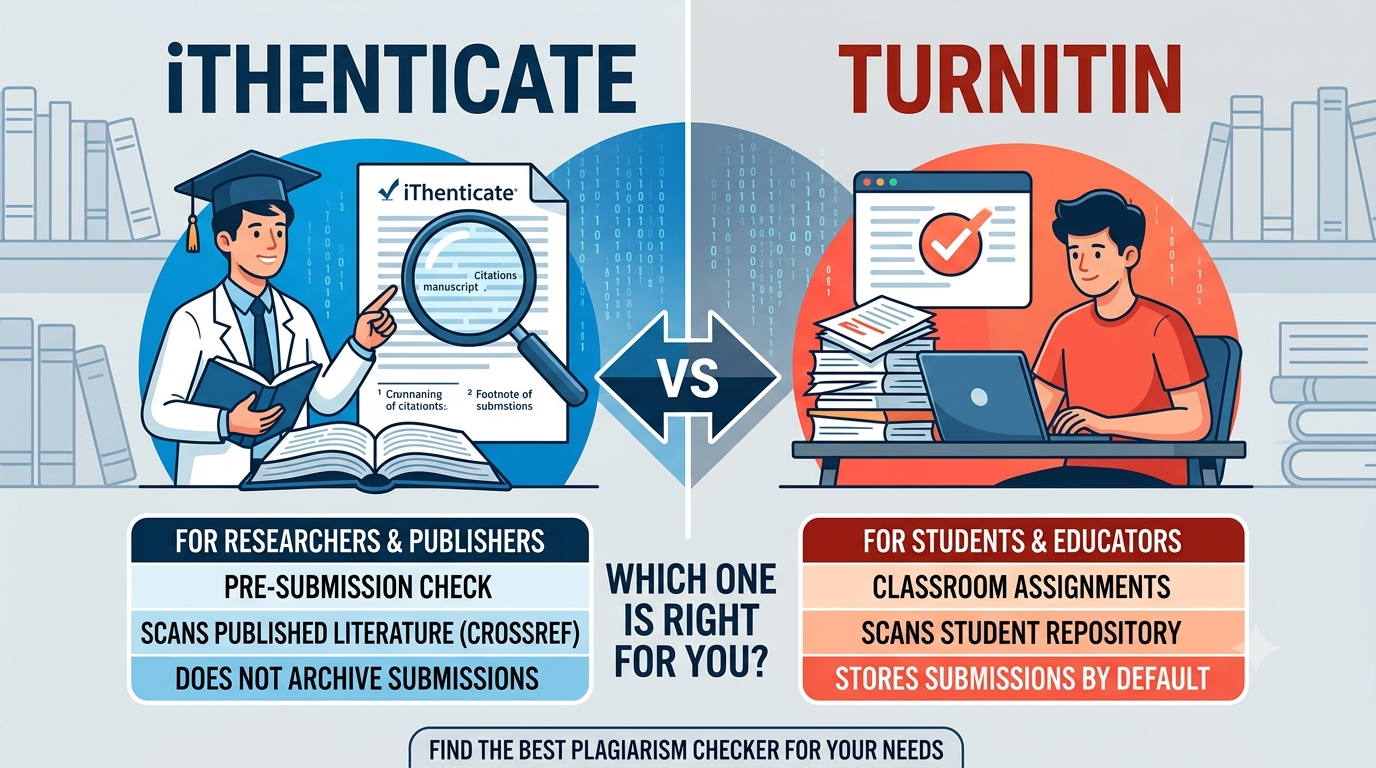
iThenticate and Turnitin are both owned by Turnitin LLC and share the same text matching core, but they serve different users. Turnitin checks student assignments and stores submissions in a repository. iThenticate screens research manuscripts and theses against published literature and does not archive your document. Publishers require iThenticate, not Turnitin.
Are iThenticate and Turnitin the same company?
Yes. iThenticate is owned by Turnitin LLC, which acquired it in 2014, and the two products share underlying matching technology. The difference is not the engine, it is the audience, the database they search and how they handle your file. Confusing them leads students and researchers to run the wrong check at the wrong stage.
Who is each tool built for?
This is the distinction that matters most.
- Turnitin is built for education: undergraduate and postgraduate coursework, assignments and theses submitted through a learning management system such as Moodle, Blackboard or Canvas. The author is typically a student.
- iThenticate is built for research and publishing: pre-submission manuscript screening, PhD and MPhil theses, grant applications and conference papers. The author is typically a researcher, postgraduate or faculty member.
How do the databases differ?
Both check against web pages and published journals, but their strengths diverge, and this is why the same document can return different scores.
| Feature | Turnitin | iThenticate |
| Primary use | Student assignments and theses | Research manuscripts, PhD theses, grants |
| Student paper repository | Yes, a core feature | No |
| Published literature coverage | 190+ million articles | 90+ million articles from 1,500+ publishers, via Crossref, Elsevier, Springer and others |
| Web pages indexed | ~47 billion (per Turnitin) | Extensive web and scholarly corpus |
| Stores your submission | Yes, by default | No, submissions are not archived |
| LMS integration | Yes (Moodle, Blackboard, Canvas) | No, folder-based tool and API |
| Powers Crossref Similarity Check | No | Yes |
Figures above are drawn from Turnitin, Crossref and university library guidance (see Sources). Because Turnitin holds a large student paper repository that iThenticate lacks, Turnitin is better at catching a classmate’s reused coursework, while iThenticate is more sensitive to overlap with published research.
Why do publishers require iThenticate and not Turnitin?
iThenticate powers the Crossref Similarity Check programme, used by more than 1,500 publisher members to screen manuscripts before peer review, according to Crossref. When you submit to most reputable journals, the editorial office runs your manuscript through iThenticate. That is why a Turnitin report is generally not accepted for journal submission, and why researchers self-check with iThenticate to see what the journal’s system will find.
Does the repository difference matter?
It matters a great deal for unpublished work. Turnitin stores submissions by default, so a draft you check can become a database entry that your final version later matches against. iThenticate does not archive submissions, which is deliberate, so a researcher can run a pre-submission check without the draft being indexed. If you are checking an unpublished thesis or manuscript, this privacy difference is the deciding factor.
How does AI detection compare?
Turnitin added an AI writing detector in April 2023 and has updated it since, and the feature is available to institutional subscribers as part of the standard platform. iThenticate added AI writing detection with its 2.0 release in July 2024, but that layer is available to institutional subscribers rather than individual per-document users. Treat any AI score as advisory, since false positives are a known risk with every detector on the market.
Which should you use?
- Undergraduate or taught postgraduate coursework: Turnitin, which your institution almost certainly provides.
- Self-checking a draft assignment: an accessible checker during drafting, then the version your marker will use for the final result.
- PhD thesis for examination: whichever tool your institution mandates, often iThenticate for research-grade work. Check your handbook.
- Journal manuscript before submission: iThenticate, because it matches what the journal’s Crossref Similarity Check will run.
For a wider comparison of checkers by use case, see our guide to the best plagiarism checkers for students, and for researchers specifically, our guide to a plagiarism checker for researchers. If you only need to see a Turnitin-style figure without an institutional login, our Scribbr vs Turnitin comparison covers the accessible options.
Frequently asked questions
Is iThenticate stricter than Turnitin?
Not stricter, but different. iThenticate compares against a large body of published literature, so a research manuscript can score higher there than in Turnitin, while Turnitin can catch reused student coursework that iThenticate would miss.
Can a student use iThenticate?
Usually only if your institution provides access, often through the library or research office for PhD scholars. It is not a classroom tool, and individual accounts are relatively expensive.
Will my iThenticate check be stored and matched later?
No. iThenticate does not archive submissions, which is why researchers use it for pre-submission checks of unpublished work.
Does a good Turnitin score mean my paper will pass a journal check?
Not necessarily. A journal runs iThenticate against published literature that Turnitin does not fully index, so you can clear Turnitin and still be flagged. Check with iThenticate before submitting to a journal.


Want more tips & great deals? Get them sent to your inbox
Please enter a valid E-mail
By clicking "Subscribe" you agree to be contacted via e-mail. You can always unsubscribe from the newsletter


